Read this doc on Scribd: DOTNETinSamples

Saturday, March 29, 2008


Monday, March 10, 2008
Access Modifiers in C#
Class Modifiers
The class is one of the two basic encapsulation constructs in C# (the other being the struct). Every executable statement must be placed inside a class or struct. Classes define reference types that are the basic building blocks of C# programs, and they are the architectural blueprint for the "objects" in OOP.
A class can be...
abstract: An instance of the class cannot be created.Usually this means the class is intended to serve as a base class.
sealed: The class cannot serve as a base class for another class (it can't be derived from). A class cannot be both abstract and sealed.
internal: The class is only accessible from other classes in the same assembly. This is the default access for non-nested types. If no modifier is specified, the class has internal access.
new: Used only with nested classes. "New" indicates that the class hides an inherited member of the same name.
private: A nested class that can only be accessed inside the class in which it is defined.
public: Instances of this class are available to any class that wants to access it.
Constructor Modifiers
A class defines data members, methods and nested types. A constructor is a special method that is normally used to initialize the data members of a class, and its name is always the same as the name of the class. Constructors have no return value, and any number of constructors can be defined within a class. If no constructor is defined, the C# compiler provides a default constructor having no parameters.
Methods
Methods are always defined within the bounds of a class or struct. Methods can be instance (called as an instance of the type within which the method is defined) or static, where the method is associated with the type itself. Methods can be declared as virtual, abstract , or sealed. Methods can be overloaded, overridden and hidden.
Access Modifiers
Access modifiers are specified as part of the method declaration syntax and can be:
internal
private
protected
protected internal
public
If no modifier is specified, the method is given private access.
virtual methods can be overriden by a derived class using the override keyword.
abstract methods must be overriden in a derived class. If any method of a class is abstract, the entire class must be declared as abstract.
sealed methods are methods that override an inherited virtual method having the same signature. When a method is sealed, it cannot be overriden in a derived class.
Method Access Modifiers
public indicates the method is freely accessible inside and outside of the class in which it is defined.
internal means the method is only accessible to types defined in the same assembly.
protected means the method is accessible in the type in which it is defined, and in derived types of that type. This is used to give derived classes access to the methods in their base class.
protected internal means the method is accessible to types defined in the same assembly or to types in a derived assembly.
private methods are only accessible in the class in which they are defined.
Executing client report from web application
protected void Page_Load(object sender, EventArgs e)
{
DataSet1TableAdapters.authorsTableAdapter ds = new DataSet1TableAdapters.authorsTableAdapter();
ds.ClearBeforeFill = true;
DataSet1.authorsDataTable dt=new DataSet1.authorsDataTable();
ds.Fill(dt, "ca");
ReportViewer1.LocalReport.ReportPath = Server.MapPath("Pubs.rdlc");
ReportViewer1.LocalReport.SubreportProcessing += new Microsoft.Reporting.WebForms.SubreportProcessingEventHandler(subReports);
}
void subReports(object sender, SubreportProcessingEventArgs e)
{
if (e.ReportPath.Equals("ClientSubReport"))
{
if (e.Parameters.Count > 0)
{
DataSet2TableAdapters.employeeTableAdapter da = new DataSet2TableAdapters.employeeTableAdapter();
da.ClearBeforeFill = true;
DataSet2.employeeDataTable dt = new DataSet2.employeeDataTable();
da.Fill(dt);
e.DataSources.Add(new ReportDataSource("DataSet2_employee",dt));
}
}
}
{
DataSet1TableAdapters.authorsTableAdapter ds = new DataSet1TableAdapters.authorsTableAdapter();
ds.ClearBeforeFill = true;
DataSet1.authorsDataTable dt=new DataSet1.authorsDataTable();
ds.Fill(dt, "ca");
ReportViewer1.LocalReport.ReportPath = Server.MapPath("Pubs.rdlc");
ReportViewer1.LocalReport.SubreportProcessing += new Microsoft.Reporting.WebForms.SubreportProcessingEventHandler(subReports);
}
void subReports(object sender, SubreportProcessingEventArgs e)
{
if (e.ReportPath.Equals("ClientSubReport"))
{
if (e.Parameters.Count > 0)
{
DataSet2TableAdapters.employeeTableAdapter da = new DataSet2TableAdapters.employeeTableAdapter();
da.ClearBeforeFill = true;
DataSet2.employeeDataTable dt = new DataSet2.employeeDataTable();
da.Fill(dt);
e.DataSources.Add(new ReportDataSource("DataSet2_employee",dt));
}
}
}
Tuesday, February 26, 2008
SSIS Issue with Excel source
I've been doing a bit of SSIS (the data transformation technology formally know as DTS), and came across a nasty issue with using an Excel source to import data. The problem may not actually lay with SSIS - the Excel Source in SSIS uses Jet under the hood, and the problem could rest entirely with Jet.
The problem occurs where you have a sparsely populated column - SSIS/Jet will only sample a certain number of rows (I think it is configurable in the registry somewhere) to determine the type of the data held in the column. Say, for arguments sake, only 20 rows are sampled and no data is found. The type of the data will default to a string. If row 21 contains a numeric type or a date, this row will be silently ignored and treated as a null. This is a pretty crappy default behaviour - silently ignoring data that you are spending a lot of time (and clients money) to import. You have been warned!
Anyhow, here's the solution, enjoy:
1. Going to the Excel Connection Manager, I changed the Connection Strings to: Provider=Microsoft.Jet.OLEDB.4.0;Data Source=H:\BillingReport\Upload.xls;Extended Properties="EXCEL 8.0;HDR=YES;IMEX=1"
Friday, February 22, 2008
MouseLight - spotlight around your cursor And ScreenLink - draw on screen
Overview: Sometimes it's difficult to tell an audience to look at a particular area of the screen. Whether its for a product demo, presentation, screencast or a lecture, this problem still exists. MouseLight tries to eliminate this problem. MouseLight puts a "spotlight" around your cursor and dims the surrounding area which enables your audience to effortlessly follow your path of movement on the screen.
Download

Overview: ScreenInk makes it possible to annotate, mark, and jot right on your screen. With several tools, such as highlighters and arrows, you can get your point across easily. This product is packed with a multitude of features, which are neatly arranged to avoid clutter. This version is the first release on CNET Download.com.
Download


Download

Overview: ScreenInk makes it possible to annotate, mark, and jot right on your screen. With several tools, such as highlighters and arrows, you can get your point across easily. This product is packed with a multitude of features, which are neatly arranged to avoid clutter. This version is the first release on CNET Download.com.
Download


Multi Skype Messanger
Run multiple Skype accounts
If you have Windows XP Pro, you can create and run more than one copy of Skype on your computer.
This lets you switch between accounts, or even chat to yourself.
To do this you will need at least one other Windows accountFollow the step's mentioned below
1 Go to Start, Control Panel, User Accounts. Load Skype as normal.
2.Then right-click the Skype shortcut holding the shift key and select Run As

3.Enter the user name and password of the other account and a second version of Skype will load.

Multi Google talk Messanger
Follow the Step's below
1.Righclick on the Google talk shorcut on the desktop.

2.Replace the text in target textbox with
“c:\program files\google\google talk\googletalk.exe” /nomutex

3.Click Ok
1.Righclick on the Google talk shorcut on the desktop.

2.Replace the text in target textbox with
“c:\program files\google\google talk\googletalk.exe” /nomutex

3.Click Ok
Thursday, February 21, 2008
Debugging Stored Procedures in Visual Studio 2005
Follow the step's mentioned below
1.The first thing you want to do is add a data connection in the Visual Studio 2005 Servers windows. Right click on "Data Connections" and click on "Add New Connection":

2.Enter the required connection info in the "Add Connection" dialog and click "Test Connection" to test the connection. If that succeeds, click OK:

3.After you add the data connection you will be able to see the connection in the Data Connections tree:
We're going to debug "uspgetbillofmaterials" in this example (any proc will do, it really doesn't matter what proc YOU use). Drill down until you can see the proc you're debugging under the "Stored Procedures" folder:

4.Right click on the proc and click "Open". You will see the proc code in the code window:

"Now we debug"
5.Now that we've figured out how to open the proc we're going to get into actually debugging it. Right click on the proc and click "Step Into Stored Procedure":

6.A window with all of the parameters for the proc will pop up:

Notice it says "The stored procedure ... REQUIRES the following parameters:" That means you are REQUIRED to fill in the values. Otherwise the debugger will quit right away. That said; click the OK button to step into the procedure. The debugger will automatically stop execution on the first line of code in the stored procedure. When the debugger has stopped execution you'll see a yellow arrow to the left of the line of code:

7.Depending on how you have your Visual Studio settings you will click either F8 (VB) or F11(C#) to go to the next line of code. The debugger will execute the previous line of code and move to the next line
Debugging of Javascript in Visual studio
A) Open Internet Explorer, Tools menu -> Internet Option Dialog box.
- Click on Advance Tab.
- Clear the checkbox: Disable Script Debugging(Internet Explorer)
- Clear the checkbox: Disable Script Debugging(Other)

B) Use the keyword debugger in your script as breakpoint from where you want to start debugging.
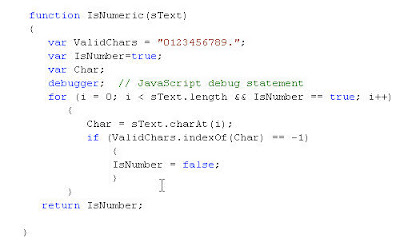
- Click on Advance Tab.
- Clear the checkbox: Disable Script Debugging(Internet Explorer)
- Clear the checkbox: Disable Script Debugging(Other)

B) Use the keyword debugger in your script as breakpoint from where you want to start debugging.

XML documentation file for comments
For the spelling mistake I have downloaded a Visual Studio free add-in.Download
Steps to install this add in.
Spell checker now supports text verification in:
- HTML style comments <-- HTML -->
- ASP.NET server side comments: <%-- ASP.NET --%>
- Java Script, C# and C++ comments: // C++ style comments
- CSS and C style comments: /* C style comments */
- VB and VBScript style comments: 'This is VB comment
- Close all the instance of the visual studio.
- Install the Add-in.
- Open the Visual Studio IDE, and open a page ex.-“html file or Class file.”, in which you want to check the spelling mistakes.
- Click on Tools Menu, you will found “Spell Check”. Just Click on it.
- If there is any spelling mistakes in the page, it will underling the word and also provides a suggestion list.
- After Installing this add-in, in case if you are unable to find the Spell Check option under Tools Menu, please Apply the following steps.
- Open the command prompt, Go to the Add in installation folder and run this command: regsvr32 vsspellchecker.dll

Find out more information about the spell checker @ http://blogs.msdn.com/mikhailarkhipov/archive/2007/12/12/spell-checker-for-html-asp-net-jscript-vb-c-css-and-c.aspx
Tuesday, February 12, 2008
sql server addons Free tools
SSMS Tools Pack - an add-in with lots of IDE options (Query Execution history, regions, debug sections, CRUD stored procedures creation, new query templates, running custom scripts from Object explorer's context menu) for SQL Server Management Studio and SQL Server Management.
Data Scripter - generates insert statements for a table
SQLDBSearch V2.0.0 (Freeware)
- With SQL Query Analyzer (SQL Server 2000) you can only search an object by its name.
- With SQL Server Management Studio (SQL Server 2005) the Filter option is very limited.
- Sp_depends can provide many irrelevant results since SysDepends table could be out off sync.
SQLDBSearch is a small and visual tool that is intended to fix this limitation and helps SQL Server developers and DBA to find objects that might be affected when they implement a database change. SQLDBSearch can find an object by its name or content in a specified database or the whole server.
The tool supports SQL Server 2005 and 2000 and requires Microsoft .Net Framework 2.0
Click here to download the tool
Click here to see some snapshots
Data Scripter - generates insert statements for a table
SQLDBSearch V2.0.0 (Freeware)
- With SQL Query Analyzer (SQL Server 2000) you can only search an object by its name.
- With SQL Server Management Studio (SQL Server 2005) the Filter option is very limited.
- Sp_depends can provide many irrelevant results since SysDepends table could be out off sync.
SQLDBSearch is a small and visual tool that is intended to fix this limitation and helps SQL Server developers and DBA to find objects that might be affected when they implement a database change. SQLDBSearch can find an object by its name or content in a specified database or the whole server.
The tool supports SQL Server 2005 and 2000 and requires Microsoft .Net Framework 2.0
Click here to download the tool
Click here to see some snapshots
Database Design principals & Normalization
Sample script to learn about database design principals.
1.Normalization concepts
2.creating database.
Normalization Database
Normalization queries
1.Normalization concepts
2.creating database.
Normalization Database
Normalization queries
Monday, February 11, 2008
sql server new features
Sample script for
- using comman type expression (CTE)
- Pivot
- cross apply
- row_number
- rank
- dense_rank
- top
- Try/Catch Error Handling
- FOR XML PATH
- view
- function
Wednesday, February 06, 2008
Minimize Ram usage upto 70%
Simpye-minimize each application that u are currently not working on by
clicking on the Minimize button & u can increase the amount of available RAM by a substantial margin.
Depending upon the number and type of applications you use together, the difference can be as much as 50 percent of extra RAM.
clicking on the Minimize button & u can increase the amount of available RAM by a substantial margin.
Depending upon the number and type of applications you use together, the difference can be as much as 50 percent of extra RAM.
Subscribe to:
Posts (Atom)


Subscribe To mvkinfo


 Posts
All Comments
Posts
All Comments
Popular Posts
|


